
Many amateur radio enthusiasts enjoy Parks on the Air. It is a global activity in which ham radio operators go out to parks and set up an “activation”. Their goal is to log at least 10 contacts while they are in the park. There are a variety of ways in which the activator may choose to activate their park: CW (Morse Code), Digital (FT8, FT4) or Voice. There are also a number of “achievements” you can get and the POTA site tracks these for you.
As a POTA “hunter”, you can try and make a contact with the “activator” from any location via their method of communication. The POTA spot site lists current spots that have occurred. My goal is to finish the last 2 states to achieve all 50 state activations along with the District of Columbia. For me, I need to activate parks in both Rhode Island and Hawaii. While there are applications that will alert you to when a park of interest is being activated, I wanted to explore Python and set up a process where I can get notified when someone is activating a park of interest.
It turns out that there is an API that displays the same information that is on the POTA spot site. It is in JSON and can be viewed here. I’m currently viewing the JSON from the API in MicrosoftEdge, which includes a Pretty-print option:

Checking the Pretty-print checkbox displays:
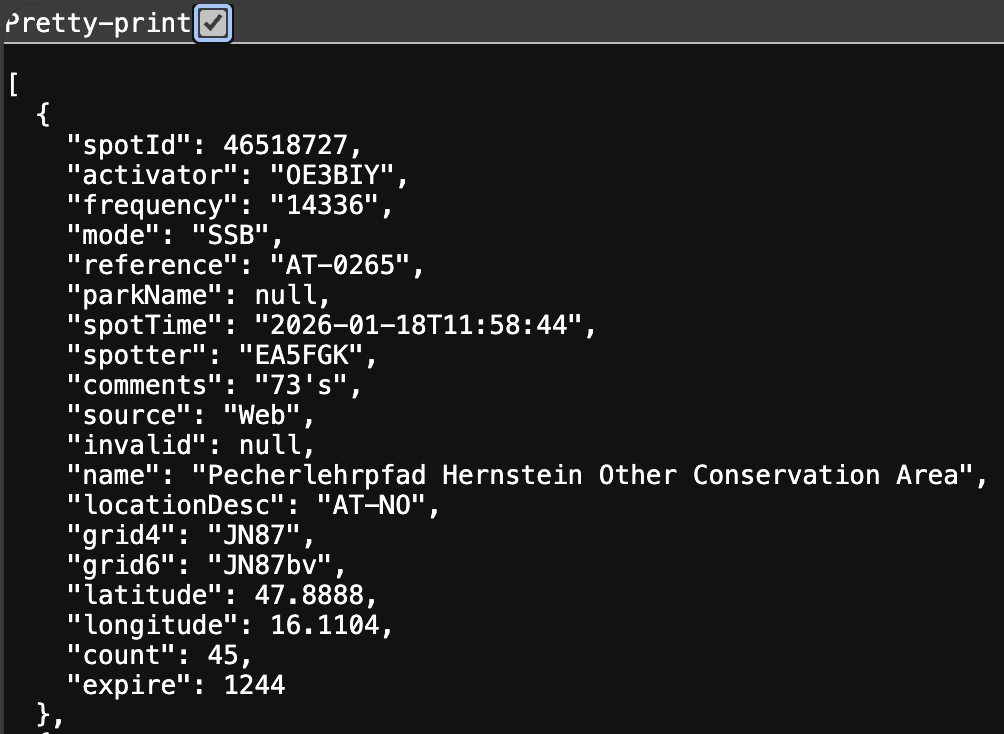
Now, in JSON, the beginning square bracket [, indicates that we have an array. An array is a collection of items and each item within the array begins and ends with { and }. The above JSON is fairly straight forward in that we have a dictionary (key, value pair). I’ve included only one of the elements of the array.
We have our API end point and we’ve been able to view the data though what are these items?
- spotId: This is a unique identifier for the spot. In this case, it is 46518727
- activator: This is the amateur radio callsign of the individual that is activating the park
- frequency: This is the frequency that the activator is transmitting on. Based upon your license in the U.S. you can transmit on the following bands. We can convert the frequency to the band that the activator is on.
- mode: This is the type of transmission that the activator is using. In this case it is SSB (Single Sideband) which is voice.
- reference: This is the park identifier that the activator is at.
- parkName: Name of the park, in this case a null is shown, this means that there is no value for this spot but the field is in the data source.
- spotTime: The time of the latest spot. Note that this is UTC time with a 0 offset. You may want to convert this time to your local time.
- spotter: This is the amateur radio callsign of the last person that spotted/contacted the activator in the park.
- comments: Any comments that the spotter might have left for the activator. In this case, it is 73’s, which means “best regards”.
- source: “Web” which means the spotter entered their information in the POTA site interactively.
- invalid: Not sure what this means as I don’t know of a data dictionary for this data.
- name: The full park name where the activator is.
- locationDesc: Identifier for where the activator is. In the US, you might see US-RI, which means the activator is in the United States and is in the state of Rhode Island.
- grid4: Grid square: In the U.S. this identifies and area that is 100 miles wide by 70 miles.
- grid6: Grid square: A smaller subsquare of about 3×4 miles.
- latitude: Location
- longitude: Location
- count: Number of spotters
- expire: Not sure
Unfortunately, the API is not documented so I’ve made some guesses at what each of these elements mean. Ok, so we have a large JSON structure, but what are we going to do with it? That will be the next post.